Britain’s Greek Supermarket

Questions? Call us 0208 0166 990

Order

How does the Buy 1 Get 1 Free offer work?

1. How does the Buy 1 Get 1 Free offer work?
When you purchase one eligible item, you can receive a second one of the same item for free. To take advantage of this offer, you must add both items to your shopping basket.

2. Why didn’t I receive my free item?
If you only added one item to your basket, the free item will not be included in your order. You need to add two of the same items to your basket, and the discount will automatically apply at checkout.

3. What if I forgot to add the second item?
Unfortunately, we cannot add the free item to your order after it has been placed. Please make sure you’ve added both items to your basket before completing your purchase.

4. Do I need a promo code for this offer?
No, you don’t need a promo code. Simply add two of the same items to your basket, and the discount will apply automatically.

5. Can I mix and match products?
No, the Buy 1 Get 1 Free offer only applies to the same product. You must add two of the same item to your basket to receive the discount.

6. Can I combine this offer with other promotions?
No, the Buy 1 Get 1 Free offer cannot be combined with other discounts or promotions unless specifically stated.

7. What happens if the item goes out of stock after I’ve placed my order?
In the rare case that the item goes out of stock, we will notify you and work with you to find an alternative or provide a refund.
Why didn’t I receive my free item? (Buy 1 Get 1 Free offers)

If you only added one item to your basket, the free item will not be included in your order. You need to add two of the same items to your basket, and the discount will automatically apply at checkout.

My order arrived with solid gel packs, but the product feels soft. Is it defrosted and can I refreeze it?

Understanding Product State and Temperature:

  • Solid Gel Packs: The presence of solid gel packs is a good sign. It indicates that the internal temperature of the packaging has likely been maintained well below the freezing point throughout transit. This helps in keeping the products at a safe temperature.
  • Soft to the Touch: Products feeling soft to the touch does not necessarily mean they have fully defrosted. Meat and other frozen foods can begin to soften before they actually enter the “danger zone” (8°C to 63°C according to the UK’s Food Standards Agency or 4°C to 60°C according to USDA), where bacterial growth becomes a concern. Softening can occur at temperatures that are still safe, such as just below freezing.

Safety and Refreezing:

  • Refreezing Guidelines: If the gel packs are mostly solid and the product has remained chilled (even if soft), it is generally safe to refreeze the product without cooking it first. The solid state of the gel packs suggests the product was kept out of the danger zone.
  • Quality Consideration: Although safe, refreezing may affect the texture and quality of the product due to ice crystals that may have formed and then partially melted. This is more noticeable in delicate items like fish or finely sliced meats.

Best Practices for Handling Deliveries:

  1. Immediate Inspection: Upon delivery, immediately check the state of the gel packs.
  2. Feel the Package: If the product feels cold to the touch, similar to how it would feel in your refrigerator, it is likely that it has been kept at a safe temperature.
  3. Refreezing: If the product is soft but cold, and the gel packs are solid, it is safe to refreeze.
How do I apply my promo / gift / coupon code?

Applying a promo / discount / coupon / gift code at GreekMarket.co.uk is a straightforward process. Follow these simple steps to enjoy the benefits of your promotional discount:

  1. Select Your Products: Browse through our wide range of Greek products and add your desired items to your shopping basket.
  2. View Your Basket: Once you’ve selected everything you need, click on the shopping basket icon at the top right corner of the page to view your selected items.
  3. Enter Promo Code: On the shopping basket page, you will find a section or a box labelled ‘Coupon Code’. This is usually located just before the checkout process begins. (see print screen)

    Greek Market - basket - printscreen - Apply Promo Code
    Greek Market – basket – printscreen – Apply Promo Code
  4. Apply the Code: Enter your promo code in the provided box. Make sure to type it exactly as it appears.
  5. Activate the Code: After entering your promo code, click on the ‘Apply’ button next to the box. This action will apply the discount associated with the code to your total order amount.
  6. Check the Discount: Ensure that the promo code’s discount has been applied to your order total. The final price after the discount should be clearly displayed.
  7. Proceed to Checkout: Once the discount is applied, you can proceed to checkout to complete your purchase. If you don’t apply the code on the previous step (shopping basket/cart page) you can still apply it on the shipping/checkout page. (see print-screen below)

    Greek Market - checkout - printscreen - Apply Promo Code
    Greek Market – checkout – printscreen – Apply Promo Code

Important Tips:

  • Validity: Before using a promo code, check its validity period to ensure it’s still active.
  • Terms and Conditions: Read the terms and conditions associated with the promo code, as there may be specific requirements or exclusions.
  • One-time Use: Most promo codes are for one-time use only, so make sure you’re ready to make the purchase when you apply it.
  • Account-specific promo codes (login required) Some promo / discount codes are issued only to specific customers (for example, as a goodwill gesture, product review reqard, loyalty reward, birthday offer, or Greek Market Prime promotion). These codes are linked to the email address on your Greek Market account.
    • To use this type of code, you must be logged in to your account before you apply it.

    • Make sure you are using the same email address that received the promo code. If you try to use the code as a guest, or while logged in with a different email, the system will show the code as invalid or not applicable.

    • If you don’t yet have an account, please create one using the same email address to which the promo code was sent, then log in and apply the code again.

Should you encounter any issues or have questions about applying a promo code, feel free to contact our customer service for assistance. We’re here to ensure your shopping experience is both enjoyable and seamless.

I’ve received only part of my order

Occasionally, due to volumetric/weight restrictions, an order consisting of two or more parcels might be delivered in parts separately, at different times on the same day, by different vans/drivers.

This applies only to multiparcel orders. A multiparcel order usually includes a dry-goods parcel and another parcel with your fridge items.

Please check your parcel tracking information for the latest delivery status updates. If you don’t have your individual parcel tracking numbers, please contact us.


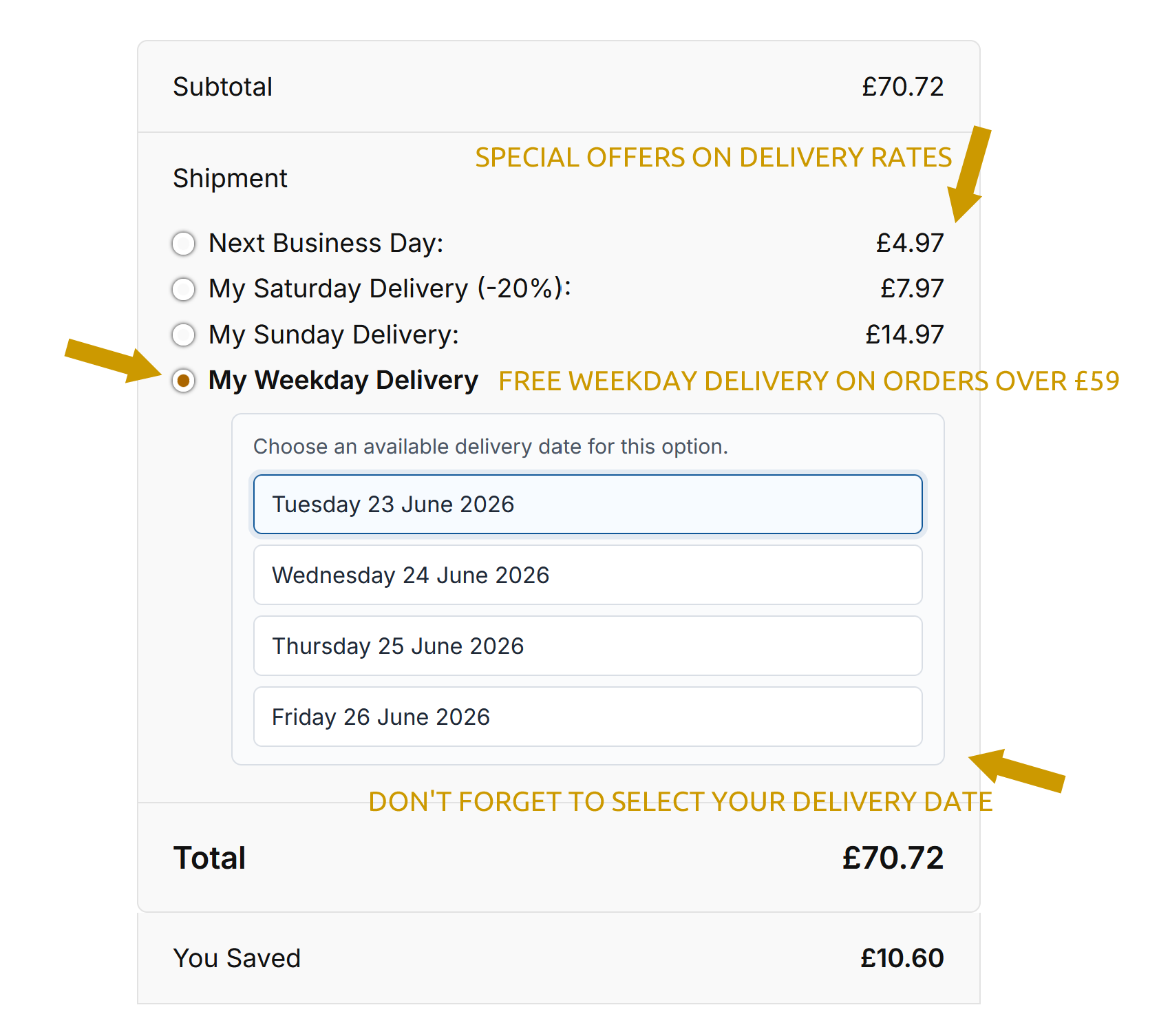
My Delivery Date

Greek Market provides you with the maximum convenience and lets you select the delivery day that suits your lifestyle.

At checkout, select one of the delivery methods (Saturday, Next Business Day (Mon-Fri) or Weekday (Mon-Fri) delivery.

Alternatively, you may select My Collection if you prefer collecting your order from our warehouse in Greater Manchester.

Prime members are eligible for My Prime Delivery (Free Next Day, Free Saturday or any other day Mon-Fri delivery).

Greek Market Delivery Date

Can I remove something from an existing order?

No, you cannot remove items. We recommend you place a new order.

Will I receive my order by Christmas/Easter?

During festive periods carrier services are stretched to the limit and our Standard delivery service times do not apply.

Our Next Business Day service, however, can provide you with a priority service.

For more information, please check our Delivery Options & Rates

Prime members orders are not affected.

Can I add to an order once it has been placed?

At Greek Market, we have a streamlined process and automated stock reservation system which reserves products as soon as you place your order. Because of this, once an order has been placed, we’re unfortunately unable to add extra items.

However, if you need to purchase additional products, here’s what you can do:

  1. Place an Additional Order
    Visit our website and place a separate order for any additional products you need.
  2. Contact Us to Combine
    After placing your new order, please use our Customer Services contact form to provide both of your order numbers. If there are at least one (1) full working day before the dispatch of your original order, we’ll do our best to combine them into a single consignment.
  3. Delivery Fees
    If we’re able to combine your orders, we’ll happily refund any delivery fee that you may have paid on your second order.


What is the minimum spend?

There in no minimum spend.

Do you price match?

Yes, we do. We’re constantly checking pricing against listed prices of our Greek products at other online shops in the UK.

In case we have missed something you can always hit the prominent “Found this product at a lower price?” button on the respective product page and let us know. We’ll match it or offer you an even lower price than our competitors.

Why can’t I checkout?

It’s likely to be one or a combination of the following issues.

  • You may not have registered on Greek Market just yet.
  • Your bank may be declining the transaction. You’ll need to contact your bank to ensure there are no problems with your card.
  • Your delivery address may be not served by our carriers. Try changing your delivery address.
  • Your account may be suspended.
Free Weekday Delivery

On orders over £59

UK-Wide Delivery

Choose your delivery date

Greek & English Support

Our team speaks both

Secure Checkout

Amex / MasterCard / Visa